· AvaGuru Engineering Team · product updates · 6 min read
What Makes a Telegram Mini App Storefront Convert Better?
AvaGuru's storefront update helps buyers find products, trust cart actions, recover checkout, and keep shopping during longer Telegram sessions.
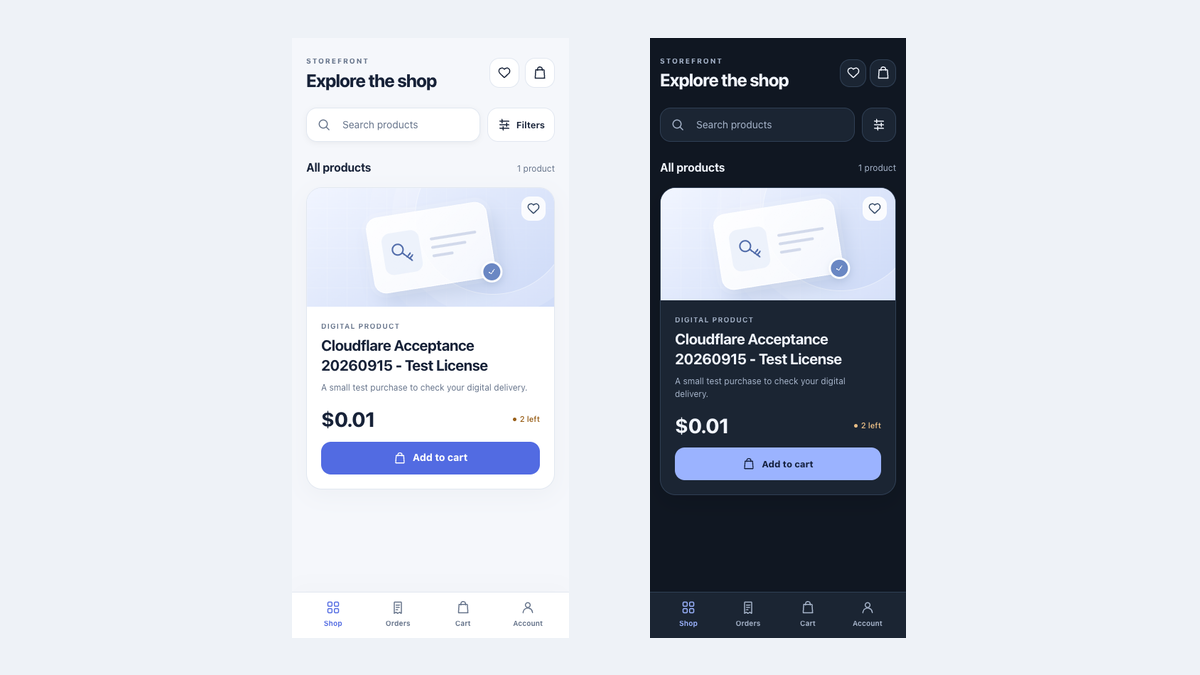
A Telegram storefront converts better when buyers can find the right product, understand price and availability, trust that Add to Cart worked, and recover if they leave a payment halfway through. AvaGuru’s storefront update improves those exact moments while keeping the shopping experience inside Telegram.
The release combines a clearer mobile interface with less visible reliability work. Buyers should notice a calmer store, not the systems running behind it.
What changed in the AvaGuru storefront?
The update covers the full path from browsing to order recovery:
- A stable search and filter toolbar
- Removable active-filter labels
- Clear price, stock, and product-type information
- Wishlist and cart access from the catalog
- Visible Added to bag feedback
- A cart that remains available until payment is confirmed
- Consistent light and dark themes
- Better recovery when a Telegram shopping session expires
- Fresher pages after an AvaGuru release
Each change addresses a point where a buyer could previously hesitate, repeat an action, or abandon the purchase.
How does the update help buyers find products faster?
Search and filters now share one predictable toolbar. When a buyer applies a category, price range, featured filter, or sort order, the active choices remain visible as removable labels.
That detail matters on a small screen. A buyer can answer two questions immediately:
- Why am I seeing this result set?
- How do I remove one condition without starting over?
Existing products remain visible while a filter update loads. The store no longer replaces a useful result grid with a large loading state every time the buyer changes a filter.
What information appears on each product card?
The updated cards show the information buyers commonly need before opening a product:
- Name and category
- Digital or physical product type
- Current price and original price when applicable
- In-stock, low-stock, or sold-out status
- Wishlist action
- Add-to-bag action
When a merchant has not uploaded product photography, AvaGuru displays a deliberate product illustration instead of a broken image area. Cards adapt from compact phone layouts to wider tablet and desktop grids.
Why is add-to-cart feedback important?
A silent Add to Cart button creates doubt. A forced jump to the cart interrupts comparison shopping. AvaGuru now keeps the buyer on the current page and changes the action to Added to bag with a check icon.
The same behavior is shared by the catalog, search results, wishlist, and product details. Buyers receive confirmation without losing their place, while the cart count updates separately.
For merchants, this can reduce accidental repeat taps and make multi-product shopping less tedious. The relevant measures are product-to-cart rate, repeated quantity corrections, and the number of buyers who continue browsing after their first add.
What changed when a buyer starts checkout?
The cart is no longer cleared simply because an order was created or a payment window opened. AvaGuru waits for confirmed payment before removing the purchased items.
This protects the recovery path when a buyer:
- Opens Stripe and closes it before paying
- Moves to the Bot chat to pay a Telegram Stars invoice
- Temporarily loses connectivity
- Returns to a pending order later
If payment is cancelled, the bag is still available for review and retry. If payment is confirmed, the order moves forward and the purchased cart is cleared.
The payment selector also avoids showing a method that the Store could not verify. A missing payment configuration produces a clear unavailable state rather than a misleading checkout option.
Why do orders stay available during a longer visit?
Telegram provides signed launch information when a Mini App opens. That proof is intentionally time-limited. Previously, a buyer who browsed for several minutes before opening Orders could encounter an authentication failure even though they had entered through the correct Bot.
AvaGuru now verifies the Telegram launch at the beginning and creates a bounded shopping session for protected pages. In customer terms, the benefit is straightforward:
- Browsing does not unexpectedly break order access.
- Checkout does not ask the buyer to repeat a recent login.
- An expired session shows a clear reopen-from-Bot action.
- Changing or disabling a Store Bot still ends access safely.
Telegram’s official guidance requires Mini Apps to validate signed launch data on the server. AvaGuru keeps that security requirement while making the normal shopping session less fragile. See Telegram Mini Apps.
How does the update affect merchants?
| Storefront change | Customer value | Merchant value |
|---|---|---|
| Search and active filters | Faster product comparison | More useful catalog discovery |
| Visible stock state | Fewer unavailable-product clicks | Clear expectations before checkout |
| Added-to-bag feedback | Confidence without interruption | Fewer repeated taps |
| Cart preserved until payment | Easier retry | Less abandoned-payment friction |
| Longer protected session | Stable order access | Fewer login-related support requests |
| Fresh page delivery | Buyers see current releases | Less cache-clearing support work |
| Light and dark themes | A more native Telegram feel | Consistent presentation |
The update does not promise a universal conversion percentage. It removes specific, observable friction. Merchants can compare search-to-product, product-to-cart, checkout-start, payment-completion, and recovery rates before and after the change.
How can a merchant test the new buyer journey?
Use this short acceptance check:
- Open the Store from its Telegram Bot.
- Search for a product and apply two filters.
- Remove one filter from the active labels.
- Save a product and add it to the bag.
- Continue browsing instead of opening the cart immediately.
- Start checkout and return without paying.
- Confirm that the bag is still available.
- Open Orders after several minutes.
- Repeat in Telegram dark mode.
AvaGuru’s own release checks cover small phones, tablets, both themes, wishlist behavior, stock limits, checkout, order access, and expired-session recovery.
What remains on the storefront roadmap?
The current product request is intentionally bounded. Very large catalogs still need a dedicated Load More or page-based browsing flow. Product variations and more advanced physical-product merchandising also require separate workflows.
For digital products, the current update focuses on the path that matters most: find the offer, understand it, add it confidently, pay, and recover if payment is interrupted.
Frequently asked questions about the storefront update
Does a Telegram Mini App replace a website?
It can replace the buyer-facing store when the audience already uses Telegram. A public website can still support search discovery, documentation, and acquisition.
Can buyers use Telegram Stars and Stripe?
Digital products are paid in Telegram Stars, because Telegram requires Stars for digital goods inside bots and Mini Apps. Physical products can be paid by card through Stripe when the merchant has configured it. Digital and physical items must be ordered separately.
Does AvaGuru store private orders for offline browsing?
No. The offline experience covers public application assets, not private order, payment, or download data.
What happens when a shopping session expires?
The buyer sees a recovery message directing them to reopen the Store from its Telegram Bot.
Does dark mode use a different catalog?
No. It is the same products, cart, and account rendered for the buyer’s Telegram theme.
Sources and release evidence
This article was prepared from the production Store by the AvaGuru Engineering Team. Before release, we checked phone and tablet layouts, Telegram themes, browsing, order access, cart recovery, and successful and interrupted payments.